41001 - Summary
1. Introduction to the Subject & Cloud Computing
1.1 Lecture
What is Cloud Computing?
Six Defining Parameters of Cloud Computing
A true cloud environment must meet these six criteria:
- Pooled Resources: Providers maintain global resource pools (Compute, Storage, Network) accessible regardless of geography.
- Elastic Scaling: Capacity follows demand curves precisely, eliminating wasted costs and preventing crashes during spikes.
- Virtualization: Physical hardware is sliced into Virtual Machines (VMs) using a hypervisor layer.
- Metered Usage: A "pay-as-you-go" model where usage is tracked at a granular level (per second or GB), converting capital risk into operating cost.
- Internet Delivery: Resources are accessed via APIs and categorized as IaaS (raw infrastructure), PaaS (dev platforms), or SaaS (ready-made apps).
- Automated Lifecycle: Provisioning and de-provisioning are fully automated through self-service portals, requiring no human intervention.
Business Benefits
- Financial Shift: Moves IT spending from large upfront Capital Expenditure (CapEx) to manageable Monthly Operational Expense (OpEx).
- Operational Focus: IT staff shift focus from maintaining hardware to core business innovation.
- Global Agility: Organizations can scale globally and achieve faster time-to-market without building their own data centers.
Infrastructure as a Service (IaaS)
Definition and Control
IaaS provides on-demand access to fundamental computing resources over the internet. Users bypass physical hardware ownership, instead renting virtualized infrastructure.
- User Control: Consumers manage operating systems, storage, and deployed applications.
- Provider Management: The cloud provider maintains the underlying physical networks, servers, and storage.
- Core Examples: Includes AWS EC2, Azure VMs, and Google Compute Engine.
Technical and Economic Parameters
- Virtualization: Physical hardware is sliced into virtual machines delivered on the fly.
- Elasticity: Infrastructure scales instantly to follow demand, preventing wasted money or system crashes.
- OpEx Model: Metered usage (per second/GB) turns large upfront capital investments (CapEx) into monthly operational expenses (OpEx).
- Automation: The full resource lifecycle is automated via APIs, requiring no human intervention for provisioning.
The 4 Layers of IaaS
- Co-location Layer: Power, cooling, connectivity, security
- Hardware Layer: Physical servers, storage, networking
- Virtualisation Layer: Slices physical into virtual resources
- Service Layer: Web console / API - your front door
Business Advantages
- Agility: Deployment time is reduced from months of physical installation to instant availability.
- Cost Reduction: Eliminates expenses for server rooms, cooling, and hardware maintenance.
- Focus: IT staff focus on application innovation rather than infrastructure management.
2. Cloud Service Models
2.1 Lecture
Platform as a Service (PaaS)
Definition and Shared Responsibility
- NIST Standard: The capability to deploy consumer-created applications onto cloud infrastructure using provider-supported languages, libraries, and tools.
- Management Boundary: Users control application settings and code; the provider manages all underlying infrastructure (network, servers, OS, storage).
- Shared Responsibility: Users manage Applications and Data; the Provider manages the Platform (Runtime, Middleware, OS) and Infrastructure (Hardware, Storage).
Key Technical Mechanisms
- Multitenancy: Multiple consumers share the same physical platform instance while remaining logically isolated.
- Logical Isolation: Software-defined segregation of compute, memory, and storage to ensure tenant privacy.
- Resource Pooling: Dynamic allocation of shared hardware to maximise efficiency and lower costs.
PaaS Architectures (Case Studies)
Google App Engine (GAE) — Four Pillars Architecture
- Google File System (GFS): Distributed storage that replicates code in 64 MB chunks for high availability.
- Datastore / Cloud SQL: Managed NoSQL (schema-less entities) or Relational (fixed schema) storage.
- Web Servers: Auto-scaled HTTP request handlers with automatic load balancing.
- MemoryStore: SSD-based fast cache for sub-millisecond data access and session continuity.
Force.com (Salesforce)
- Metadata-Driven: Applications are not pre-stored as static views; they are assembled from metadata at runtime.
- Polymorphic Abstraction: Identifies the requesting tenant and routes them to their specific metadata and data.
- Development Model: Supports Declarative (No-Code drag-and-drop) and Programmatic (Apex / Visualforce) builds on the same platform.
Pricing and Implications
- Pricing Models:
- Subscription: Fixed fee for defined resource tiers.
- Consumption: Pay-as-you-go based on actual usage (CPU, RAM, bandwidth).
- Freemium: Free basic tier with upgrades for advanced features.
- Key Benefits: No upfront capital expenditure (CapEx), no maintenance responsibility, and focus shifts entirely to application logic.
Software as a Service (SaaS)
Definition and Characteristics
- NIST Standard: Software applications provided as a service over the internet, accessible via web browsers or thin client interfaces.
- Utility Model: Applications are provided on-demand, shifting software from a product "ownership" model to a service "consumption" model.
- Provider Management: The SaaS provider manages the entire stack below the application, including hardware, frameworks, and core code.
- Shared Code Base: All consumers share the same program code, enabling massive scale and centralised updates.
Traditional Procurement vs. SaaS
- Traditional Pain Points: High upfront capital (CapEx), long deployment times (months to years), and ongoing maintenance burdens for IT teams.
- SaaS Advantage: Eliminates upfront costs, provides immediate access ("utility" model), and removes responsibility for patches and upgrades from the enterprise.
Enterprise Integration Challenges
Most organisations operate in a Hybrid Reality, maintaining some legacy on-premise systems while adopting SaaS for specific functions.
Three Implementation Flavours
- Pure SaaS: Complete migration; no in-house applications remain.
- SaaS Consuming On-Premise (Hybrid Front-End): Core logic is in the cloud but references local data (e.g., a cloud CRM pulling from local inventory).
- On-Premise Consuming SaaS (Hybrid Back-End): Main interface remains in-house but outsources specific functions to the cloud (e.g., local payroll using cloud HR data).
The Integration Broker Architecture
A central intermediary responsible for managing data flow, security, and transformation between on-premise and cloud sinks.
The Four Pipeline Modules:
- Data Security: Authenticates sources, decrypts data, and scans for threats.
- Validation & Transformation: Matches data formats between source and sink.
- Data Synchronisation: Ensures consistency using mechanisms like Polling (time-based), Push (event-based), or Publish/Subscribe.
- Routing: Determines the correct destination based on metadata rules.
Key Insight: The Pipeline is the workhorse (sequential processing), while the Metadata Layer is the brain (intelligence for all modules).
Data Synchronisation Mechanisms
| Mechanism | Type | Scaling | Pros / Cons |
|---|---|---|---|
| Polling | Time-based | Poor | Simple but wastes messages and isn't real-time |
| Push | Event-based | Limited | Real-time and efficient for pairs, but complex for many sinks |
| Publish/Subscribe | Decoupled | Excellent | Combines speed with multi-sink scaling via a message broker |
3. Virtualisation in Cloud Computing
3.1 Lecture
Core Concept
Virtualisation allows multiple users to share one physical system while each user feels like they have their own dedicated machine. It is the foundation of cloud computing and enables multi-tenancy in SaaS systems.
Virtualisation Basics & What is a VM?
A Virtual Machine (VM) is a software-based slice of a physical computer.
| Feature | Meaning |
|---|---|
| Resource Sharing | Many VMs run on one physical server |
| Isolation | Each VM is independent |
| Efficiency | Idle capacity becomes usable |
Types of Virtual Machines
| Type | OS Layer | Performance | Typical Use | Examples |
|---|---|---|---|---|
| Process VM (PVM) | Shares host OS | Lightweight | Run one application | Java Virtual Machine, Google App Engine |
| System VM – Host (Type 2) | Guest OS on Host OS | Moderate | Development, testing | VirtualBox, VMware Workstation |
| System VM – Native (Type 1) | Guest OS directly on hardware | High | Cloud & data centres | VMware ESXi, Microsoft Hyper-V, Amazon EC2 |
Hypervisor (VMM)
The Virtual Machine Monitor (Hypervisor):
- Creates and manages VMs
- Allocates CPU, RAM, storage
- Translates hardware requests
- Enables VM migration
Types:
- Type 1 runs on hardware.
- Type 2 runs on a host operating system.
Virtualisation in the Cloud
Cloud providers create the illusion of infinite capacity using:
| Mechanism | Purpose |
|---|---|
| Automated Provisioning | Automatically place VMs on servers |
| Elastic Operations | Move VMs at runtime (live migration) |
| Workload Consolidation | Pack VMs onto fewer servers to save cost |
Result:
- Server utilisation increases (from ~20% to ~70%)
- Energy and hardware costs decrease
- Resources appear unlimited to users
Applications of Virtualisation
| Application | Benefit |
|---|---|
| Server Consolidation | Fewer physical servers needed |
| Security via VMM | Centralised monitoring and control |
| Desktop Virtualisation | Centralised desktop management |
Multi-tenancy
Definition: Multi-tenancy means multiple customers share the same application and infrastructure, but their data is isolated.
Multi-tenant Data Approaches
| Approach | Structure | Isolation | Scalability | Multi-tenant Level |
|---|---|---|---|---|
| Separate DB | One database per tenant | Full | Poor | Not truly multi-tenant |
| Shared DB + Separate Schema | One DB, multiple schemas | Logical | Moderate | Partially multi-tenant |
| Shared DB + Shared Schema | One DB, one schema, TenantID column | Row-level | High | Fully multi-tenant |
Most modern SaaS platforms use Shared DB + Shared Schema.
Overall Story of This Topic
- Virtualisation: Transforms physical hardware into flexible virtual machines.
- Cloud Computing: Uses automation and VM migration to create elastic, scalable infrastructure.
- Multi-tenancy: Extends sharing from hardware level to application and database level.
Together, they enable modern cloud platforms to be scalable, cost-efficient, and efficient.
3.2 Lab
Register and Start Lab
Step 1: Register for AWS Academy (Check Outlook for this AWS Academy link)
Step 2: Start the Learner Lab (In Canvas -> Modules -> Learner Lab -> "Start Lab" -> wait 1-2 minute for the button the turn green -> click the green button to go to the AWS Console)

Create EC2 Instance
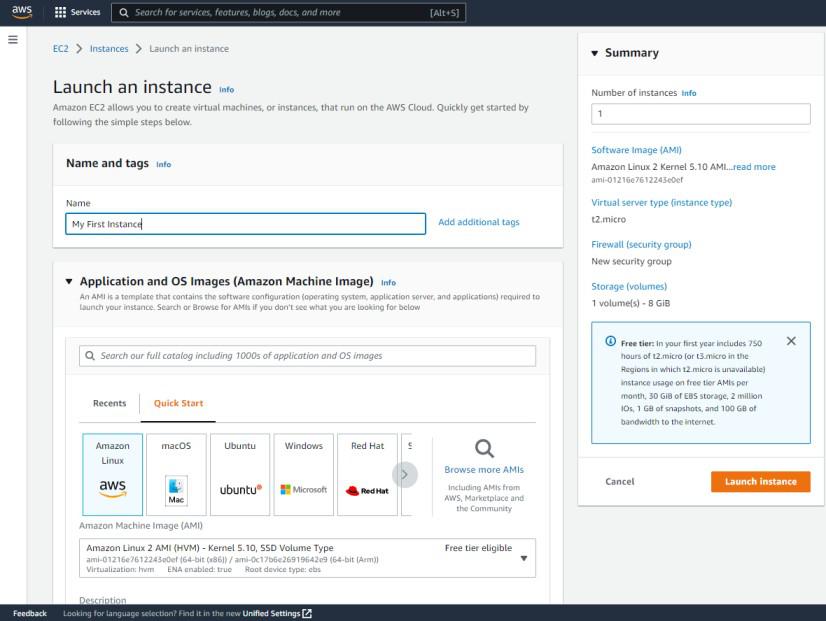
- Navigate to EC2 Dashboard
- Click on "Launch Instance"
- Select an Amazon Machine Image (AMI)
- Select an Instance Type
- Configure Security Group (For now just allow 0.0.0.0 to access from anywhere)
- Create a new key pair
- Download the .pem file
- Launch the instance
Creating and Using a Custom AMI

Create a Custom AMI
- Select your running instance (checkbox)
- Click Actions → Image and templates → Create image
- Image name: "MyCustomAMI"
- Click "Create image"
- Navigate to AMIs in the left menu. Wait for status: "Available"
Launch from Custom AMI
- In the AMIs dashboard, select your custom AMI
- Click "Launch instance from AMI"
- Select 13 micro, use existing key pair "mynewkp", select existing security group
- Click "Launch instance"
- Return to Instances dashboard. You should see two running instances
4. AWS Elastic Beanstalk
4.1 Lecture
AWS Elastic Beanstalk (EB)
AWS Elastic Beanstalk is a Platform as a Service (PaaS) offering that allows developers to deploy applications without the need to manually configure servers or infrastructure.
Core Concepts and Lifecycle
- Application: Represents the overall project folder.
- Version: A specific, labeled iteration of the application code.
- Environment: The actual provisioned AWS resources running a specific version.
- Lifecycle: The process follows four stages:
- Create Application (select platform)
- Upload Code (zip or S3)
- Launch Environment (automatic provisioning)
- Manage Environment (monitor health and iterate)
Web Server Tier Architecture
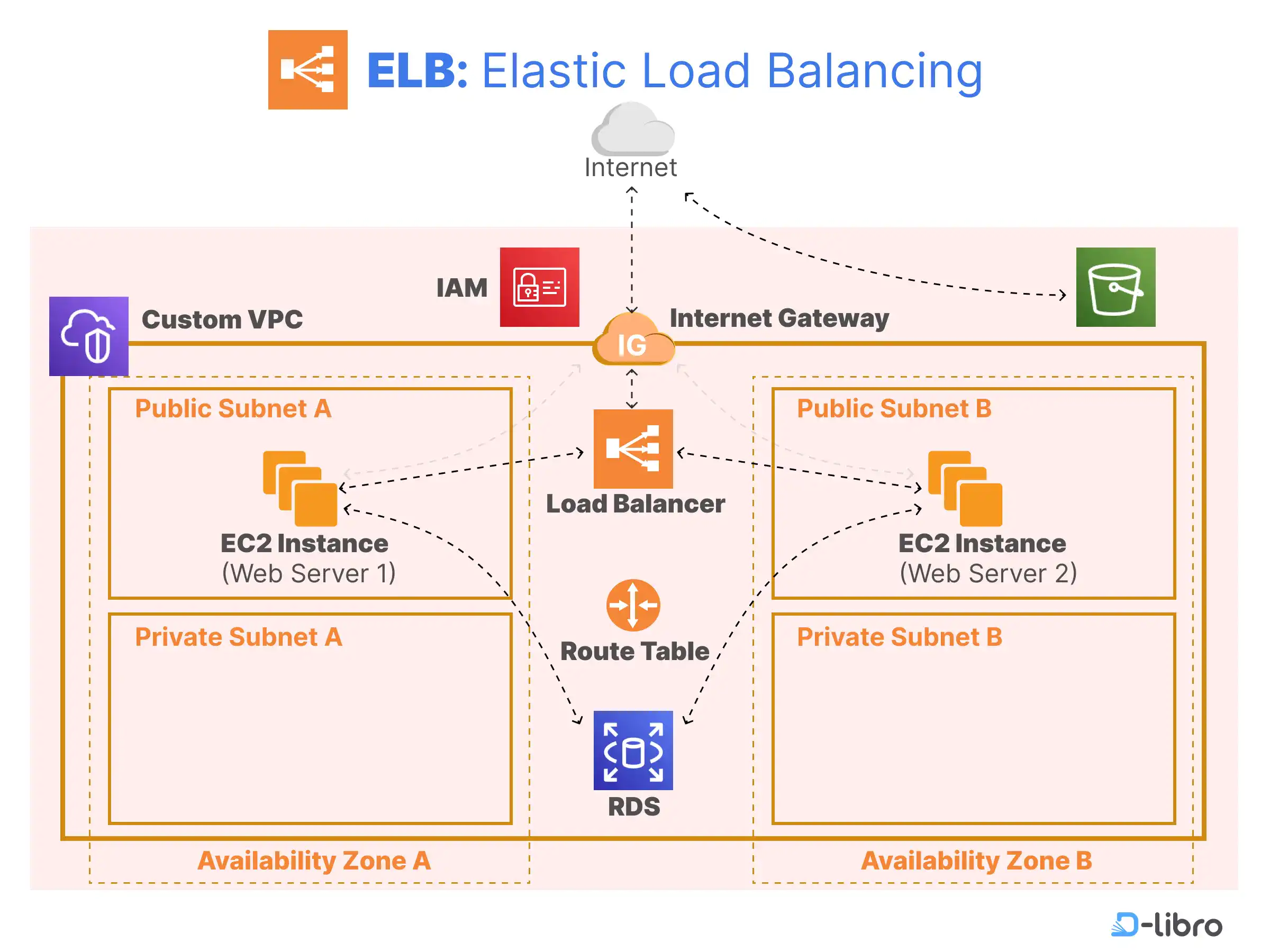
The Web Server Tier is customer-facing and designed to handle HTTP/HTTPS requests with high responsiveness. It automatically provisions six architectural layers:
| Component | Responsibility |
|---|---|
| EC2 Instances | Virtual servers running the application code via a "Host Manager". |
| Security Groups | Software firewalls that default to allowing traffic on ports 80 (HTTP) and 443 (HTTPS). |
| Availability Zones (AZs) | Independent data centers within a region providing local resilience. |
| Auto Scaling Group (ASG) | Dynamically adjusts instance counts based on demand spikes or lulls. |
| Elastic Load Balancer (ELB) | Distributes incoming traffic and signals the ASG to scale when capacity is reached. |
| Amazon RDS | Managed relational databases paired with the application environment. |
Worker Tier and Decoupling
The Worker Tier is used for decoupling resource-intensive background tasks from the front end to prevent the web server from becoming unresponsive.
- Use Cases: Handles time-intensive tasks like credit history checks, AI scoring, and report generation.
- Amazon SQS (Simple Queue Service): Acts as the central coordination mechanism. The web server places jobs into this managed queue.
- Daemon Process: A background process in the worker tier that continuously polls the SQS queue and assigns jobs to available worker instances.
- Key Difference: Unlike the Web Server Tier, the Worker Tier is not customer-facing and has no public application URL.
Key Benefits
- Speed: Transition from code to a running application in minutes.
- Abstracted Management: EB manages patching, scaling, and backups on the user's behalf.
- Cost-Efficiency: The Elastic Beanstalk service itself is free; users only pay for the underlying resources (EC2, S3, RDS) it provisions.
4.2 Lab
Create AWS Elastic Beanstalk
- Start the AWS Lab, Navigate to Elastic Beanstalk
- Deploying Sample Application
- 2.1 Click "Create Application"
- 2.2 Environment tier -> Web server environment
- 2.3 Create Application information + Environment information
- 2.4 Platform: "PHP"
- 2.5 Platform branch: "PHP 8.5 running on 64bit Amazon Linux 2023"
- 2.6 Platform version: "4.10.0 (Recommended)"
- 2.7 Application code: "Sample application"
- 2.8 Presets: "Single instance (free tier eligible)"
- 2.9 Configure service access: Service access
- 2.9.1 Service role: LabRole
- 2.9.2 EC2 key pair: LabinstanceProfile
- 2.9.3 Security group: vockey
- 2.10 Click: Skip to Review -> Create environment
- Monitor Environment Health
- 3.1 After deploying done, under the page, there is a Events, Health, Logs, ...
- 3.2 To create a Cloud Watch Dashboard
- 3.2.1 Click on "Monitoring" in the left menu
- 3.2.2 Click on "Add to dashboard"
- 3.2.3 Click on "Create new" -> "name it" -> click: create -> Add to dashboard
- 3.2.4 If want to add more widget, click plus icon (on the right of save button) -> select metric -> EC2/By Auto Scaling Group/etc -> select 1 of the line from the list -> click: Create widget
- 3.2.5 Click: Save
What Elastic Beanstalk Provisioned For You
- EC2 Instance
- Security Group
- Auto Scaling Group
- CloudWatch Monitoring
- Application Deployment
Deploy Custom Application on AWS Elastic Beanstalk
- Create a New Environment
- Repear the same steps as Create AWS Elastic Beanstalk until Application code, instead of Sample application, select "Upload your code"
- Version Label: v1.0.0 and Upload your code (upload zip file that download from canvas)
- Then Deploy
5. Customising AWS Elastic Beanstalk
5.1 Lecture
1. High Availability (HA) Elastic Beanstalk
A High Availability environment is designed to be "production-grade," ensuring the application remains accessible even during hardware or data center failures.
- Architecture: Unlike single-instance setups, HA environments distribute multiple EC2 instances across at least two different Availability Zones (AZs).
- Redundancy: By spreading instances across multiple AZs, the system ensures fault tolerance; if one data center (AZ) experiences a power or internet failure, the others continue to serve traffic.
- Comparison: While single-instance environments are "simple and affordable" for development, they represent a "single point of failure". The tutor explicitly recommends HA for anything user-facing or revenue-generating.
2. Auto Scaling Groups (ASG)
Elastic Beanstalk uses ASGs to manage the "fleet" of EC2 instances automatically based on demand.
- Capacity Settings:
- Minimum (): The fewest instances AWS will keep alive, even at zero demand.
- Maximum (): The upper ceiling that caps your AWS bill.
- Desired: The target number of instances AWS aims to maintain right now.
- Scaling Lifecycle: The process follows a continuous loop: Launch (starts desired instances) Monitor (watches metrics) Breach (threshold crossed) Scale (adds/removes instances) Cool Down (wait period to prevent rapid oscillation).
- Triggers: Common metrics include average CPU Utilization (e.g., scale up at 70%, down at 30%), Request Latency, and Network I/O.
3. Elastic Load Balancers (ELB)
The Load Balancer acts as the "front door" to your fleet, distributing incoming requests across healthy instances.
- Application Load Balancer (ALB): Operates at OSI Layer 7. It is "content-aware," meaning it can route traffic based on URL paths (e.g.,
/apivs/images) or host headers. This is the recommended default for most web apps. - Network Load Balancer (NLB): Operates at OSI Layer 4 (Transport). It is designed for ultra-high performance and low latency, handling millions of requests per second. Use cases include gaming, IoT, and real-time data streaming.
- Classic Load Balancer (CLB): A legacy product operating at Layers 4 and 7. It is deprecated and should only be used for old "EC2-Classic" instances.
4. EC2 Instance Types
Choosing the right instance is a "Core Decision Framework": Start General, Measure, then Specialize.
- General Purpose (T3, M5): Balanced compute, memory, and networking. Ideal for web apps and dev/test.
- Compute Optimized (C5, C6i): Higher-performance processors for CPU-bound tasks like heavy mathematical crunching or video rendering.
- Memory Optimized (R5, R6i): Designed for massive in-memory datasets (e.g., Redis) or sub-millisecond data access like bank fraud detection.
- Accelerated Computing (P4, G5): Uses hardware accelerators (GPUs/FPGAs) for parallel processing like Machine Learning or genomics.
- Storage Optimized (I3, D2): High-speed disk throughput for massive sequential data scans, such as Hadoop clusters or Turnitin-style document comparisons.
5. AWS Regions and Availability Zones (AZs)
The tutor uses a Campus Analogy to explain global infrastructure:
- Region: The geographic area/City (e.g., Sydney). Each region is independent and isolated to ensure data sovereignty and low latency for local customers.
- Availability Zone (AZ): The Campus Building. An AZ consists of one or more discrete data centers with redundant power and networking. AZs are connected by low-latency fiber optic cables.
6. Virtual Private Clouds (VPC) and Subnets
- VPC: Your private, logically isolated network within AWS. A single VPC spans all Availability Zones in its Region.
- Subnet: A smaller range of IP addresses carved out of your VPC.
- The Hard Constraint: "One Subnet, One AZ". A subnet exists in exactly one AZ and cannot span others.
- Security Strategy: Place Load Balancers in Public Subnets (internet-facing) and keep EC2 instances/databases in Private Subnets for "defense in depth".
7. Health Monitoring and Metrics
Visibility is split into three categories:
- CloudWatch Monitoring: Infrastructure-level metrics like CPU and Network I/O. These drive automation like Auto Scaling.
- Enhanced Health Reporting: Uses an agent on each instance to report OS and application-level vitals (latency, HTTP 5xx error rates) every 10 seconds. Uses color codes: Green (OK), Yellow (Warning), Red (Degraded), and Grey (Severe).
- Event Streaming: A "digital paper trail" or dash-cam that records deployments, scaling events, and config changes. Events are retained in the console for 6 weeks.
8. AWS CloudFormation (IaC)
Infrastructure as Code (IaC) treats infrastructure like software code—versioned, tested, and reproducible.
- Templates: JSON or YAML files that act as a "blueprint" for all resources.
- Stacks: A running instance of a template. Every Elastic Beanstalk environment is technically a CloudFormation stack behind the scenes.
- Benefits: It offers Reproducibility (identical environments every time), Automatic Rollback (reverts to last good state if a change fails), and Clean Deletion.
9. Spot Instances and Fleet Composition
During the console demo, the tutor highlights Spot Instances as a cost-saving measure:
- Definition: Spare AWS capacity offered at a steep discount (up to 90% off) compared to On-Demand prices.
- The "Catch": If AWS needs the capacity back or you are outbid, you get a 2-minute notice to vacate the instance.
- Strategy: You can create a "Mixed Fleet" in Elastic Beanstalk, combining On-Demand instances (for baseline reliability) and Spot instances (to handle spikes cheaply).
5.2 Lab
AWS Elastic Beanstalk Customization
Summary and Guide
Objective
- Build a custom network foundation: VPC, subnets, Internet Gateway, and route tables
- Create custom security controls: Security Group with explicit rules and a Key Pair for SSH
- Launch a customised EB environment: custom VPC, HA, ALB, ASG, RDS, and notifications
- Verify the deployed architecture: EC2 instances in custom subnets across different AZs
Step 1-2: VPC and Internet Gateway
- Create Custom VPC
- Navigate to VPC Dashboard
- Select "Create VPC"
- Select "VPC only"
- Name your VPC (e.g., MyCustomVPC)
- IPv4 CIDR: 10.0.0.0/16
- Click "Create VPC"
- Create and Attach Internet Gateway
- Click "Internet gateways" in VPC sidebar
- Click "Create internet gateway"
- Name it (e.g., My Custom|GW)
- Actions → "Attach to VPC"
- Select your custom VPC → Attach
Steps 3-4: Two Subnets, Two AZs
(Two data centres, two subnets)
- Subnet 1: Availability Zone A
- VPC sidebar → Subnets → "Create subnet"
- Select your custom VPC
- Name: MySubnet 1
- AZ: Select first AZ in list (e.g., ap-southeast-1a)
- CIDR: 10.0.1.0/24 (256 addresses)
- Subnet 2: Availability Zone B
- Click "Add new subnet" (same page)
- Name: MySubnet2
- AZ: Select a different AZ (e.g., ap-southeast-1b)
- CIDR: 10.0.2.0/24 (256 addresses)
- Click "Create Subnet"
Steps 5-6: Route Table and Association
- Part 1: Create Route Table
- VPC sidebar → Route Tables → Create route table
- Select your custom VPC
- Name it (e.g., MyRouteTable)
- Part 2: Add Internet Route
- Edit routes → Add route
- Destination: 0.0.0.0/0
- Target: Internet Gateway
- (select your custom IGW)
- Associate with Subnets
- Edit subnet associations
- Select both subnets:
- MySubnet1 (AZ-a)
- MySubnet2 (AZ-b)
- Save associations
Example of picture:
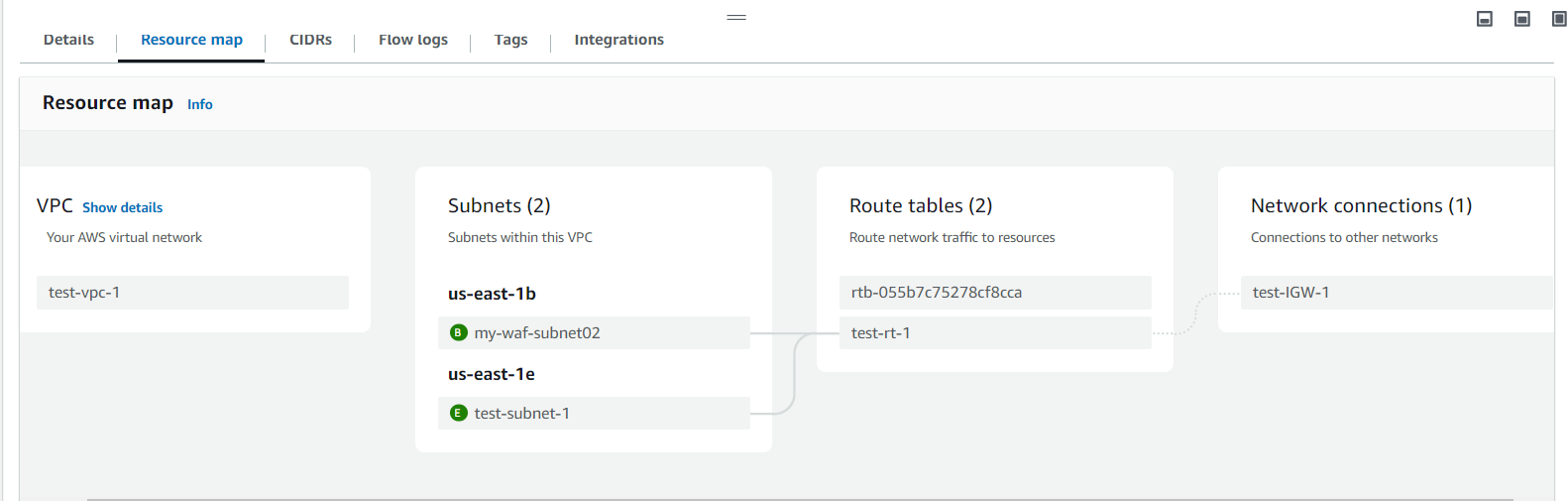
Create Your Security Controls
- Create a security group with SSH and HTTP rules
- VPC sidebar → Security Groups → Create
- Name: MySecurityGroup
- VPC: Select your custom VPC
- Add inbound rules:
Type Port Source SSH 22 0.0.0.0/0 HTTP 80 0.0.0.0/0
- Create a key pair for SSH authentication
- Services → EC2 → Key Pairs
- Click "Create key pair"
- Name: MyKeyPair
- Type: RSA, Format: .pem
- .pem file downloads automatically
Customise Elastic Beanstalk
- Create an EB application and environment with your custom VPC
- Configure High Availability with ALB and Auto Scaling
- Add an RDS MySQL database with Multi-AZ
- Enable email notifications via SNS
6. AWS Storage Services
6.1 Lecture
Cloud Storage Solutions and Implementations
1. Key Performance Metrics
Engineers evaluate storage based on these core characteristics:
- Durability: The mathematical probability that data will not be lost (e.g., 99.999999999% or "11 nines").
- Security: The protection of data from unauthorized access.
- Cost: The price of storage (e.g., Dollars per gigabyte ($/GB)).
- Availability: The percentage of time a system is operational and accessible (e.g., 99.99% allows 52 minutes of yearly downtime).
- Performance: Measured by latency, throughput, and IOPS (Input/Output Operations Per Second).
- Scalability: The ability to grow or shrink capacity and compute power as needed.
- Integration: The ability to integrate with other services.
2. The Three Storage Types
AWS organizes its services by how "abstract" they are for the developer:
| Type | Service Example | Best Use Case |
|---|---|---|
| Block | Amazon EBS | Databases (MySQL, MongoDB) and high-performance apps. |
| File | Amazon EFS | Shared content management, DevOps, and home directories. |
| Object | Amazon S3 | Media storage (videos/images), static websites, and data lakes. |
- Block Storage is the least abstract, interfaced like a physical hard drive (SATA/SSD) for high-speed, low-latency tasks.
- File Storage uses a directory hierarchy (folders/paths) and is ideal for systems where multiple users need to access the same files simultaneously.
- Object Storage is the most abstract, storing data as "blobs" accessible via web APIs rather than a traditional file system.
3. Optimizing for Cost and Access
The lecture highlights Amazon S3 for its versatility and tiering:
- S3 Standard: For frequently accessed data.
- S3 Glacier: For long-term archives, offering up to a 95% price reduction compared to the standard tier.
- Lifecycle Management: Systems can automatically move data between tiers to save money as access patterns change.
6.2 Lab
S3
- Part 1: S3 Basics
- Created an S3 bucket (globally unique name)
- Uploaded a file
- Made it public
- Accessed via object URL in browser
- Key idea:
- Files can be accessed directly without any server
- Part 2: S3 Management
- Enabled versioning
- Keeps old versions when overwriting files
- Created lifecycle rule
- Delete old versions after 30 days
- Built a static website
- Uploaded:
- index.html
- error.html
- Enabled S3 website hosting
- Key idea:
- S3 can act like a web server
EBS
- Part 3: EBS (Block Storage)
- Created:
- Security group + key pair
- 2 EC2 instances (different AZs)
- Created 100GB EBS volume
- Attached to EC2
- Ran Linux commands:
- Format disk (mkfs)
- Mount disk
- Downloaded file from S3 using wget
- Created:
- Key idea:
- You manually manage storage like a real disk
- Part 4: Snapshots & Recovery
- Detached EBS volume
- Created a snapshot
- Restored it in a different AZ
- Attached to another EC2
- Verified data is still there
- Key idea:
- Snapshots enable disaster recovery across AZs
7. Force.com PaaS: Data Objects
7.1 Lecture
Force.com PaaS — Lecture Summary
This lecture introduces Force.com as a Platform as a Service (PaaS) by Salesforce, contrasting it with the previous week's AWS Elastic Beanstalk. The key shift is from code-centric to declarative development — building entire apps without writing code.
What is Force.com?
Force.com is a cloud development environment where you build apps using point-and-click tools. It's important not to confuse it with Salesforce.com, which is a SaaS product for consuming CRM. Force.com is where you build; Salesforce.com is what you use.
The Six Core Topics
1. Applications are just skeleton containers (like folders) that hold objects, tabs, and fields. They have no functionality on their own until you populate them.
2. Objects and Tabs (MVC) — Force.com follows the MVC pattern. Custom Objects are the Model (database tables stored in the cloud, with API names ending in __c). Tabs are the View (the UI for an object). The platform itself acts as the Controller by default.
3. Custom Fields — You define the data structure of objects by adding fields. Force.com offers many field types grouped into families: Text, Number, Selection (Picklist), Date/Time, and Relationships. All custom fields end in __c to distinguish them from standard fields.
4. Relationships — There are exactly two relationship types. A Lookup relationship is optional and flexible (deleting the parent leaves the child intact). A Master-Detail relationship is tighter — the child cannot exist without the parent, and deleting the master cascades to delete all detail records. The Schema Builder gives you a visual map of your data model.
5. Validation Rules — These are formula-based rules that block a record from saving when the formula evaluates to TRUE. The key example: Date_of_Birth__c > TODAY() prevents future dates of birth from being entered. A critical gotcha: the rule does nothing unless the Active checkbox is checked.
6. Page Layouts — These control what users see on a record form, not what the database stores. You can create named sections, arrange fields in one or two columns, and hide fields without deleting their data. Different user profiles can have different layouts for the same object.
The Case Study
Throughout the lecture, an HRM application is built with three objects: Position (linked via Lookup to Job Application), Job Application (with a DOB validation rule), and Interview Review Score (linked via Master-Detail to Job Application, with cascade delete enabled).
8. StuVac
8.1 Study Break
No lecture this week
9. Force.com PaaS: Security
9.1 Lecture
Security of Force.com Objects
1. Core Idea: Shared Responsibility
Security is split between the cloud provider (physical infrastructure, network, data centre) and you (application security, object/field access, record-level policies). Both keys are needed to secure the application.
2. The Three Security Layers (Gates)
Every user request passes through three sequential gates. A closed gate blocks everything behind it — you cannot skip or bypass one.
| Gate | Name | Controls |
|---|---|---|
| 1 | OLS — Object-Level Security | Can the user access this object at all? (CRUD) |
| 2 | FLS — Field-Level Security | Which fields can the user see or edit? |
| 3 | RLS — Record-Level Security | Which specific records can the user access? |
Key rule: OLS access does NOT guarantee field access. Field access does NOT guarantee record access. Each layer is independent.
3. Part 1: Profiles
A profile is a collection of settings assigned to a user. Every user has exactly one profile; multiple users can share the same profile.
A profile controls: app visibility, tab settings (Hidden / Default Off / Default On), CRUD permissions per object, field-level security, login hours, and IP restrictions.
4. Part 2: OLS and FLS
OLS (Object-Level Security) — CRUD permissions per object, set within the profile.
- Create / Read / Update / Delete — each granted independently
- Note: enabling Edit auto-grants Read; enabling Delete auto-grants Read and Edit
FLS (Field-Level Security) — per-field visibility within an object, three states:
- Editable — user can see and change the field
- Read-only — user can see but not change it
- Hidden — field is completely invisible
5. Case Study: HRM App (Company X)
One Employee object, four different views based on security settings:
| User | Records Visible | Field Access |
|---|---|---|
| Employee | Own record only | All fields; Salary/Performance read-only |
| Head of Area | Department only | Standard fields editable; TFN, DOB, Salary, Illness hidden |
| HR Manager | All supervised staff | Full CRUD, all fields |
| CEO | Company-wide | Full CRUD, all fields |
Important: this is an access hierarchy, not an organisational reporting hierarchy.
6. Part 3: Record-Level Security (RLS)
OLS alone cannot restrict which records a user sees — it only grants access to the object as a whole. RLS fills this gap.
Step 1 — OWD (Organisation-Wide Default)
Sets the baseline record access posture for the entire org. Always start with Private and open up selectively.
| Setting | Effect |
|---|---|
| Private | Users see only records they own (recommended starting point) |
| Public Read Only | Everyone can view all records; only owner can edit |
| Public Read/Write | Everyone can view and edit — use with caution |
Step 2 — Role Hierarchies
Grants access upward in the hierarchy. A user inherits visibility of all records owned by users below them. Two steps required: (1) define the hierarchy, (2) enable "Grant Access Using Hierarchies" per object — doing only one has no effect.
Step 3 — Sharing Rules
Automated rules that grant access beyond what OWD and role hierarchies cover. Two types:
- Owner-based — share records owned by a specific group
- Criteria-based — share records that match a field condition (e.g. Department = Computer Science)
Create a Public Group first, then write a sharing rule targeting that group.
Step 4 — Manual Sharing
The record owner grants one-off access to a specific user or group, directly from the record page (not Setup). Temporary and revocable at any time.
Analogy: OWD = building policy. Role Hierarchy = elevator access. Sharing Rules = permanent key card to a wing. Manual Sharing = a visitor pass to one room.
7. Profiles vs Role Hierarchies
| Profiles | Role Hierarchies | |
|---|---|---|
| Controls | What you can do | What you can see |
| Covers | CRUD, FLS, tabs, login hours | Record visibility (upward only) |
| Depends on | Nothing | OWD must be set first |
Both are required — they work together, not as substitutes.
8. The Design Pattern
Start restrictive, open selectively:
OWD = Private  →  Role Hierarchy  →  Sharing Rules  →  Manual Sharing
(lock it down)     (open upward)      (open by group)    (open one record)
Never start permissive and try to lock down. You can always open access later; restricting it retroactively is unreliable.
9. Summary — 6 Key Takeaways
- Security is a shared responsibility between provider and tenant admin.
- Each user has exactly one profile; profiles govern OLS, FLS, tabs, and app access.
- OLS, FLS, and RLS are independent gates — passing one does not guarantee the next.
- Always start with Private OWD; never start permissive.
- Role hierarchies must be both defined and enabled per object to take effect.
- Sharing rules handle systematic group access; manual sharing handles one-off exceptions.
10. Force.com PaaS: Automation
10.1 Lecture
Automating Workflows
1. Context
Week 7 built the data model. Week 8 locked it down with security. Week 9 makes it work automatically — no code required. Workflows add intelligence on top of the structure and security already in place.
2. Case Study: University A Admissions
Three roles drive the scenario: the Student (submits application, never logs into Force.com), the USSO (receives and forwards applications), and the FSSO (assesses and decides). The system must automate five tasks across the admissions journey using just two workflow rules.
3. Part 1: Workflow Rules
A workflow rule monitors a record for a specific condition and fires one or more automated actions when that condition is met. Every rule has three components:
| Component | What it does |
|---|---|
| Object | The object being monitored (one per rule) |
| Evaluation Criteria | When the rule checks the record |
| Rule Criteria | The condition that must be true for the rule to fire |
Evaluation Criteria — three options:
- Created — fires once when the record is first created. Never re-evaluates.
- Created, and Every Time Edited — fires on every save. Cannot use time-based actions.
- Created, and Edited to Subsequently Meet Criteria — fires only when an edit causes the record to newly satisfy the condition. Supports time-based actions. Most commonly used.
When in doubt, Option 3 is the safest choice.
4. Part 2: Workflow Actions — Three Types
One rule can trigger all three action types simultaneously.
Task Assignment — creates and assigns a task to a user or role. Used when a human needs to do something. Configure: Assigned To, Subject, Due Date (calculated from trigger), Status, Priority, Comments.
Field Update — automatically changes a field value on the record with no human intervention. Important: leave "Re-evaluate Workflow Rules" unchecked to avoid infinite loops.
Email Alert — sends an email using a pre-built template to a specified recipient. The template holds the content; the alert handles the delivery. They are separate objects linked together.
A new workflow rule defaults to Inactive. Nothing happens until you click Activate — this is the most common reason automation appears not to work.
5. Part 3: Time-Based Workflows
When an action needs to happen days or hours after the rule fires (not instantly), you add a time trigger to the same rule. No separate rule is needed.
How it works:
- Rule fires → time trigger enters the Workflow Queue
- Platform monitors the queue and counts down
- On the scheduled day, the platform re-evaluates the criteria — if the record still qualifies, the action executes; if not (e.g. student withdrew), the action is cancelled
This re-evaluation is the safety mechanism that prevents outdated actions from firing.
A single rule can carry multiple time triggers (e.g. Day 30, Day 60, Day 90), each with its own action.
6. Part 4: Email Templates
Templates hold the email content and are linked to an Email Alert action. Three concepts to know:
Template Types — Text and HTML with Letterhead are most common for workflow alerts. Text is simplest.
Merge Fields — dynamic placeholders that pull live record data at send time. Syntax: {!Object__c.Field__c}. Example: {!Application__c.First_Name__c} resolves to the student's actual name.
Available for Use — a checkbox on the template that must be ticked. If unchecked, the template is invisible in the email alert dropdown. This is the most common reason a template appears to be missing.
7. Case Study Summary — Full Workflow System
Two rules, four actions, two templates, zero lines of code:
Rule 1 — New Application Received (fires on Create, criteria: Status = New Application)
- Task: Assign FSSO to assess within 5 days
- Field Update: Change status to "Being Processed with the FSSO"
- Email Alert: Send acknowledgement to student (immediate)
Rule 2 — Student Accepted (fires on Edit to Meet Criteria, criteria: Status = Accepted)
- Time-Based Email Alert: Send registration reminder 30 days after acceptance (only fires if status is still Accepted at Day 30)
8. Key Rules to Remember
- One workflow rule = one object. You cannot span multiple objects in a single rule.
- Immediate actions fire in under one second. Time-based actions enter a queue and execute on schedule.
- Always plan your rules and actions on paper before touching the console.
- Always activate the rule — inactive rules do nothing.
- Always tick "Available for Use" on email templates or they will not appear in alerts.